
Photography Tips From One Tightwad To Another
Y’all know that I love photography, right? I’m not a professional by any means, but I really enjoy taking pictures, editing them and then sharing them with you! I’ve had some questions about photography over the last few months, so I thought I’d write my favorite, frugal tips into a post for you. Fun, right?!?!
I started out experimenting with photography with my point and shoot. There are SO many different things you can do with a point and shoot. If that is what you have and can afford then use it to it’s highest potential.
- Start by reading your owner’s manual
- Turn off the flash and use natural light
- Experiment with different settings
- Have fun with it!
I was amazed at how much I could do with my Canon Powershot camera!
Now, I’m using a Canon Rebel XSi and I love it. Truly. I’m dying to get another lens because I’m still using the lens that came with the camera. It works. Remember the “tightwad” word in this post’s title. Ahem.
I’ve learned so much from other bloggers about how to take great photographs. Darcy wrote an amazing series called 31 Days To A Better Photo and Kate wrote a great post on Better, Brighter Blog Photos then she hosted a few awesome bloggers who compared different aspects of photography.
Read all those posts and you’ll be a photography superstar! 🙂
I have three favorite photo editing programs. Remember I’m a tightwad…so all these programs are free!
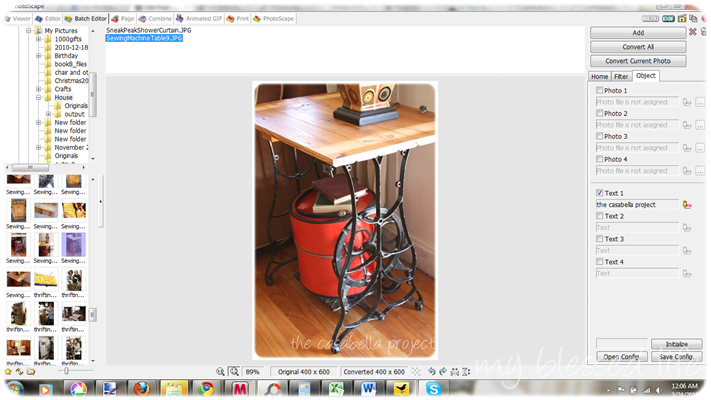
- Photoscape – I love this program. It’s so easy to edit photos and even batch edit. I can watermark my photos and resize them all with the click of a button. Awesomesauce!
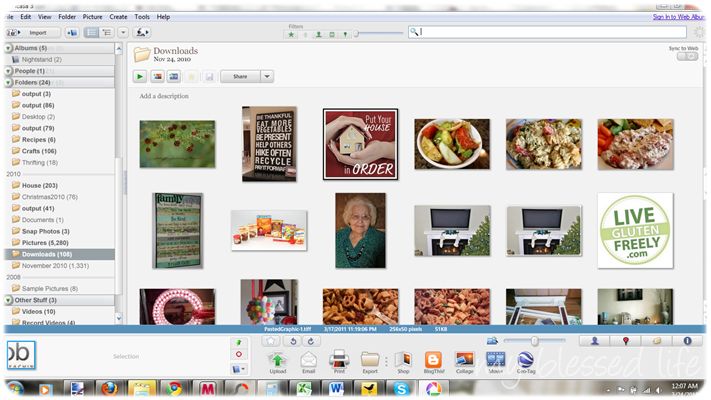
- Picasa – I used Picasa when I first started photo editing a few years ago. My favorite Picasa feature is the collage feature. It’s so easy to use!
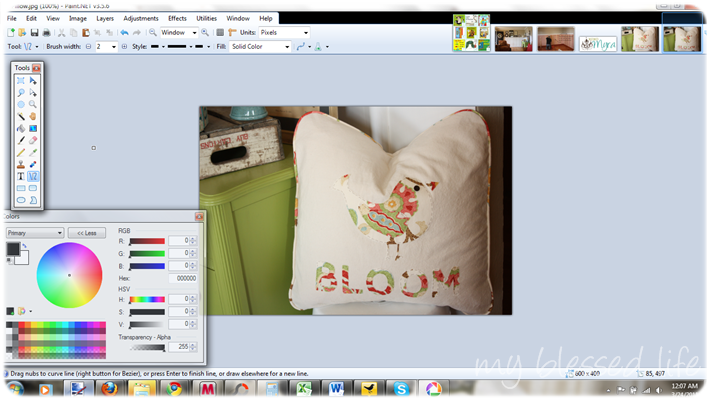
- Paint.net – This, my friends, is Photoshop for tightwads. I haven’t shelled out big bucks yet for Photoshop, but someday I would love to have it. For now, Paint.net is a wonderful program where you can edit {touch up} photos, create graphics and much more.
So there you have it. My short list of photography tips, links and editing programs. Don’t feel intimidated or that you have to try everything. Find what works for you and go for it!
Now, I’d love to hear from you!
What kind of camera do you use? What program do you use to edit your pictures?
Linked to:
I use Paint.net. It does what I need and does it well. I have a little green Sanyo camera that I got about a year and a half ago and love it. It’s a point and shoot but has some great features like adjustable ISO.
Micha´s last blog post ..Favorite Spring Recipes
I’ve been editing my photos from my point and shoot with Picnik. I am going to try out a few of these others. Thanks for the tips!
I’m so tickled to see this post, because I just purchase a Canon Rebel XS last month. I’ve been having fun learning with it. Also been searching for as many free “online helps” as possible, so this post is PERFECT! I had a film SLR years ago, but I’ve been using a 3mp old fuji point and shoot my brother “handed down” to me for the last 5 years (it has a great lens, so I’m keeping it around!). I’m still using the kit lens too-so let me know when you find a deal on a 50mm upgrade!
Great information Myra! Thanks!
I use an old Fuji point n’ shoot and I use Picnik to edit. It’s super easy.
~Liz
Great tips!I haven’t tried Paint.net, but I do love Picasa–the collage feature is so nice for bloggers. 🙂 I use a Nikon D3000, but I carry a Sony Cybershot in my purse…I love that little camera!
I agree with Barbie. You have to check out picnik.com for grey editing features. Also download Gimp. It’s like Photohop, allows you to create layers and all that good stuff. Personally I purchased Paintshop Pro X instead if Photoshop and I’m glad I did! It’s VERY similar but easier to understand and use for us novices.
Heather B (HomemadeMom)´s last blog post ..High-end boutique clothing in affordable mix & match sets for boys
These are great tips, Myra!
Robyn | Add a Pinch´s last blog post ..A Back Porch Herb Garden
I’ve been looking for something like this! Thanks for the info! 🙂
Mariposa´s last blog post ..Baby Bump- Its Been Awhile
I love taking pictures myself, thank you for writing a post about it 🙂
I’ve been using picasa and photoscape as well, and now I’ll go check out Paint.net since you’ve suggested it.
PS: Oh, I suffering so much since my camera is broken 🙁
Estrella Azul´s last blog post ..Time Wanted
Love the tips, particularly the one about reading the camera manual. If one googles the name of the camera, it’s also easy to find online forums discussing the ins and outs of using the camera.
Paint.net sounds intriguing. I use Photoshop Elements, but I’d love to be able to create graphics which I don’t feel like I can do with elements.
Oh, I have a Canon Rebel, a digital one, but it’s old – about 5 years old. I use my SLR lens with it, though I’d love to get an additional digital lens.
Thanks Myra for the tips! I have been wanting to watermark my photos. Traci uses windows live writer but she has a PC. I have a Macbook. Do these programs work with that?
I absolutely love my camera…its a GE X5, nothing terribly fancy, but it does a great job! I use Picnik.com for all of my photo editing, I subscribe for the premium options and find that it is well worth it. I absolutely LOVE Picnik!
I used to love microsoft image composer. has anyone heard of it?
Are you using the Canon EOS Rebel XSi Digital SLR Camera? I’m looking for a new camera. I loved my canon powershot but when it wore out I bought a sony and the sony is literally the worst camera I’ve ever had. I’m looking for another good camera.
I am confused about size of pic needed for making photo books. I always just used them out of the camera as is, but the book company ends up cropping so much of the pic out. So I started cropping them and putting “fancy” frames around etc and editing in other ways only to have them cropped out (book making) or edits changed (when printing them). Any insight here? thankyou
A a photographer I am appreciated you topic. This are really helpful to a professional photographer.
Clipping Road´s last blog post ..Image Masking Services
Photo Editing is now easy with Google’s Snapseed. It has huge range of features and an intuitive interface. Just like you’d expect, this free photo editing app comes with a range of preset filters. However, unlike most apps, you can edit these filters and even create your own from scratch. It also has all of the classic tools, such as cropping, straightening, frames, text, vignettes, etc.
I like Picasa for photo editing on your list. All edits are easy, using simple, intuitive controls with Picasa. It takes very little time to get photos from your camera organized and sorted on your computer, tweaked and ready for sharing. Picasa is owned by Google and has one-click sharing options for Google+, Blogger and YouTube.
Rashed Shaon´s last blog post ..How to Become a National Geographic Photographer